 Qazi Forex Tips
Why traders stop keeping a journal, and how this one fixes it
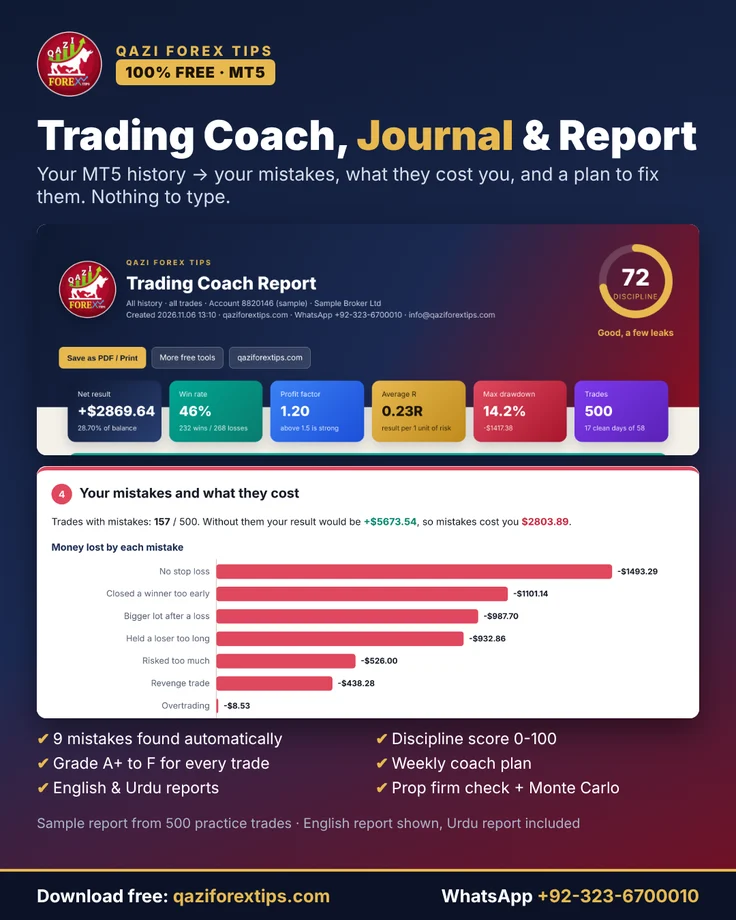
Every trading coach says "keep a journal". Most traders stop after a few weeks because typing every trade into Excel or a website takes 15-30 minutes a day, and paid web journals break on broker imports and cost $30-80 a month. Worse, they show numbers (win rate, profit factor) but do not tell you what you are doing wrong. Tools like Edgewonk can track discipline, but only if you tag every trade by hand. QFT Trading Coach does all of it automatically inside MetaTrader 5.
| Feature | Excel / web journals | QFT Trading Coach |
|---|---|---|
| Enter or import trades | By hand or broker import | Automatic from MT5 history |
| Win rate, profit factor, drawdown, R | Yes | Yes |
| Finds trading mistakes | Only if you tag each trade | 9 mistakes, automatic |
| Money each mistake cost you | No | Yes, unique |
| Grade for every trade (process, not profit) | Rare | A+ to F |
| Weekly coach plan from your own trades | No | Yes |
| Sessions, hours, days and symbols | Sometimes | Yes, with graphs |
| Prop firm check and Monte Carlo | Paid plans | Included |
| Warnings while you trade | No | Revenge, lot, no stop, daily limit |
| Report in Urdu | No | English and Roman Urdu |
| Price, privacy | $30-80 a month, data on their server | Free, data stays on your PC |
Practice alone repeats mistakes; practice with a record and a reviewer fixes them. Dr. Qazi explains why in herd mentality in forex trading.
Features
Reads every closed trade from your MT5 history: entry, exit, lots, stop loss, result, swap and commission.
Revenge trade, bigger lot after a loss, no stop loss, risked too much, trading after the daily limit, overtrading, holding a loser, closing a winner early, trading near big news.
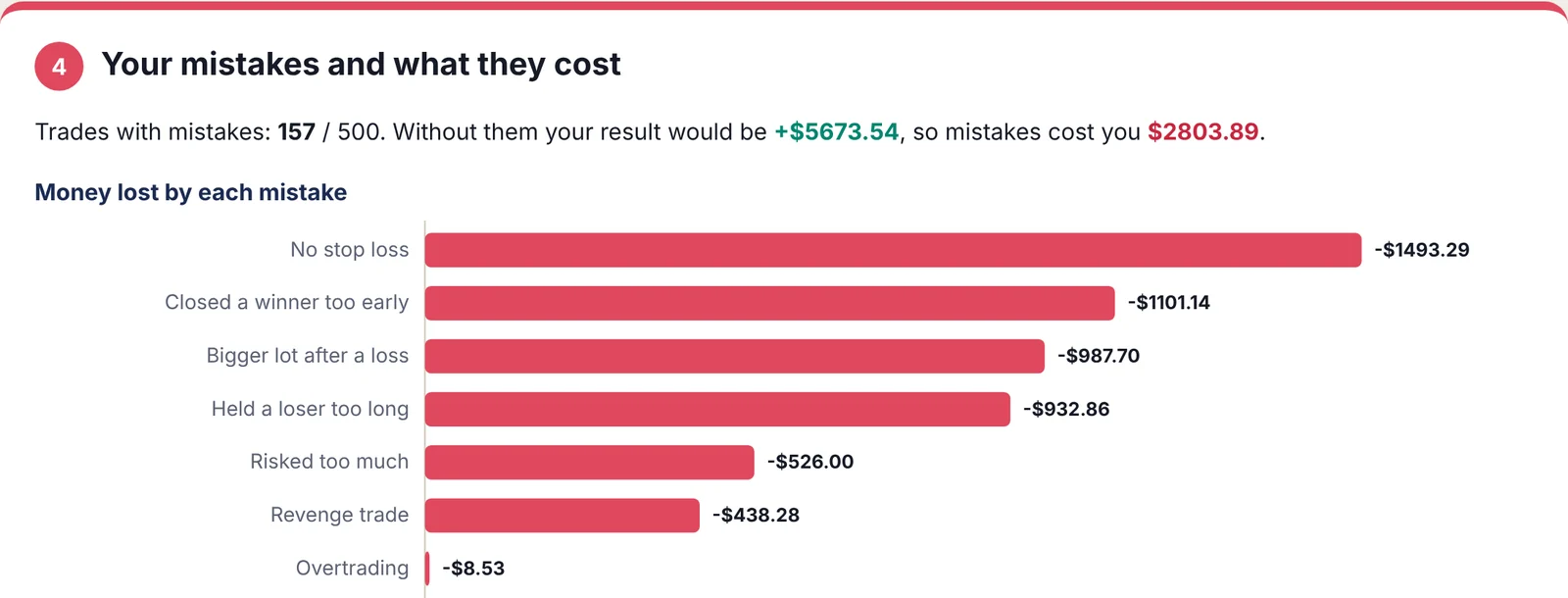
The money result of the trades with each mistake, plus your result without them. Students finally see their mistakes in dollars.
One number for how cleanly you follow good habits, with a 12-week graph of your progress.
Judges how you traded, not whether you won: stop loss, risk and emotional mistakes.
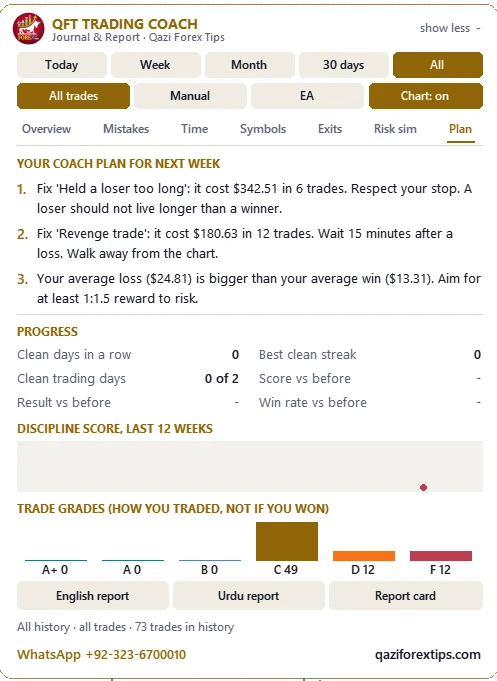
Three rules built from your own trades, sorted by how much money they can save.
Win rate, profit factor, average R, result per trade, average win and loss, drawdown, losing streak, best and worst day.
Asia, London, London + New York and New York results, by hour and by weekday.
Trades, win rate, profit factor and result for each symbol.
From real price data: how far price went for and against each trade and how much of the best move you kept.
Your trades against 5% daily and 10% maximum loss rules: PASSED or FAILED.
1000 simulations of your next 100 trades: chance of profit, worst drawdown, chance of losing half.
Possible revenge trade, bigger lot after a loss, no stop loss, daily limit reached. Optional push to your phone.
12 colourful graphs, a learning box under each, free lesson links, glossary and trade list. Save as PDF in one click.
A 1080 × 1080 image with your score, result and biggest leak for WhatsApp or Facebook.
No account, no server, no internet connection. The Windows Save As window lets you save reports anywhere.
The panel inside MT5
The coach sits on your chart as a small panel. Pick a period, then open the tabs: Overview, Mistakes, Time, Symbols, Exits, Risk sim and Plan. The Plan tab turns your own trades into three rules for next week.
What the report looks like
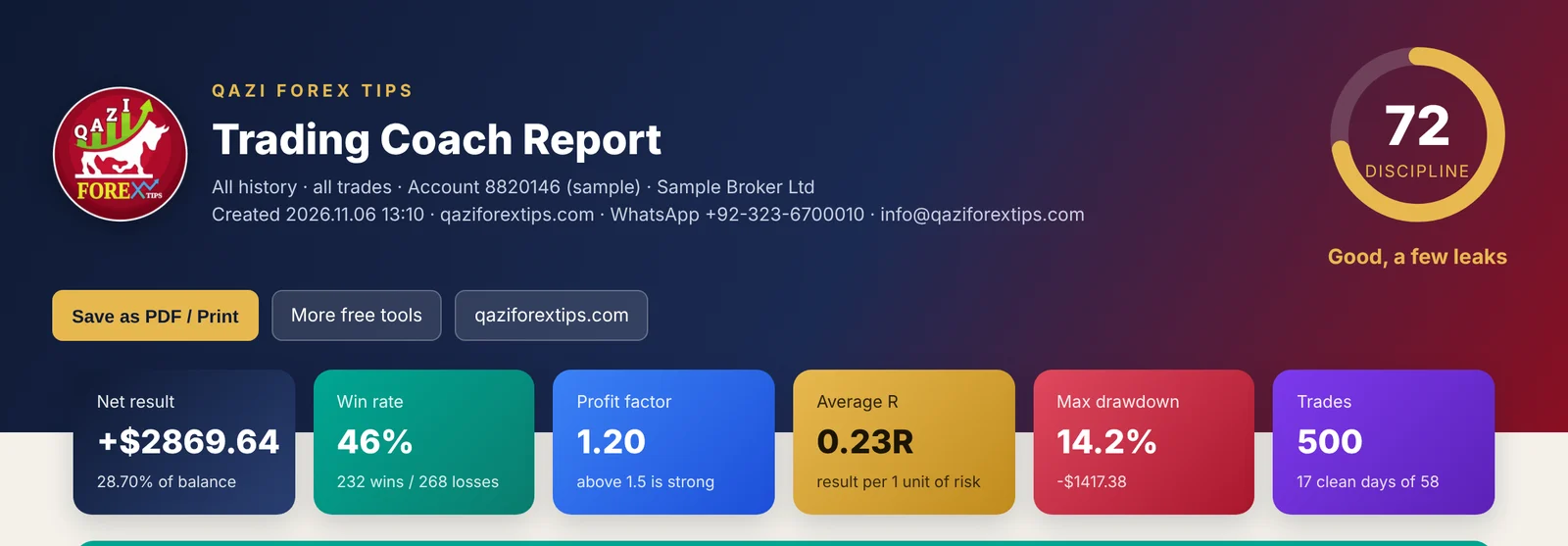
The images below come from a sample report built from 500 practice trades over 11 weeks: a trader who starts with emotional mistakes and becomes disciplined. Your own report uses your real MT5 trades.
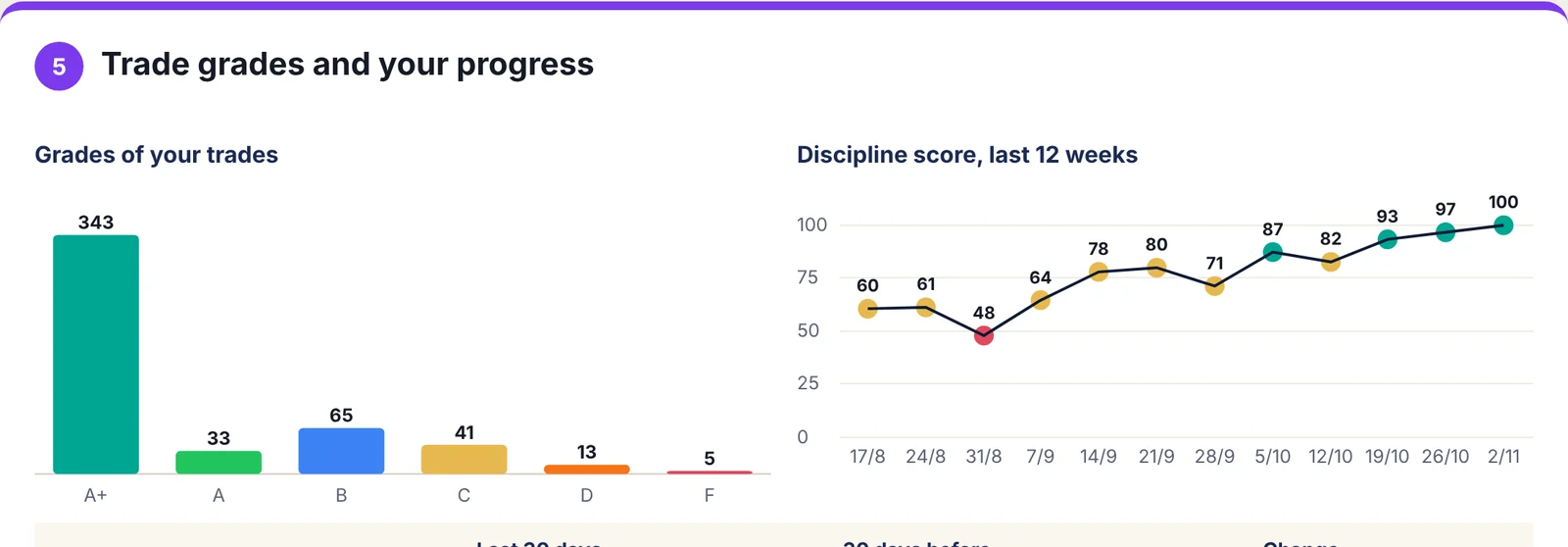
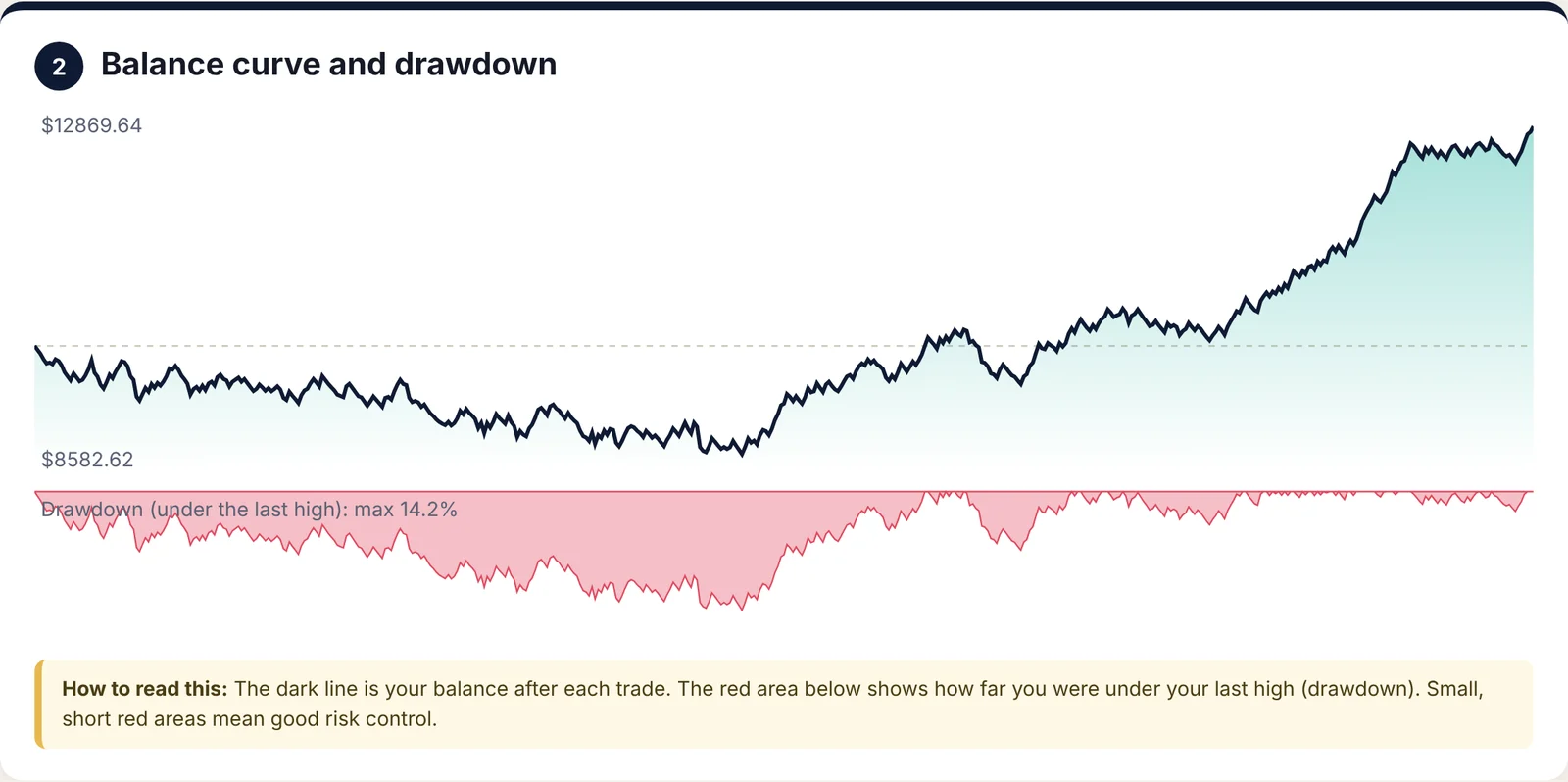
The 9 mistakes it finds
| Mistake | Marked when (default) | Learn more |
|---|---|---|
| Revenge trade | New trade within 15 minutes after a loss | Trading psychology |
| Bigger lot after a loss | Lot 30%+ bigger than the losing trade | Money management plan |
| No stop loss | Trade opened without a stop loss | Stop loss and take profit |
| Risked too much | More than 2% of the balance at risk | Lot size |
| Traded after daily limit | Opened after a 3% loss that day | Drawdown |
| Overtrading | More than 2 × your normal trades per day | Trading psychology |
| Held a loser too long | Loser open 2 × longer than your average winner | Stop loss and take profit |
| Closed a winner too early | Kept less than 40% of the best move | Risk reward ratio |
| Traded near big news | Within 15 minutes of high-impact news | News trading |
Install in 2 minutes
- Download the free zip and unzip it (right-click → Extract All).
- In MetaTrader 5 open File → Open Data Folder → MQL5 → Indicators and copy QFT_Trading_Coach.ex5 there.
- In the Navigator (Ctrl+N) right-click Indicators → Refresh.
- Drag QFT_Trading_Coach onto any chart. In the Common tab tick Allow DLL imports (only for the Save As window and opening the report) and press OK.
- In the Toolbox → History tab right-click → All History once, so the coach reads all your trades.
Free download, version 1.40, for MT5. The zip contains the indicator (.ex5), a READ ME and the Install Guide & Features PDF with Roman Urdu steps: read the PDF.
Khulasa (Roman Urdu / Hindi)
- Bilkul free trading journal MT5 ke liye: aap ki history khud parhta hai, kuch type nahi karna parta.
- 9 mistakes khud pakarta hai, jaise revenge trade, loss ke baad bara lot aur stop loss ke baghair trade, aur batata hai ke har mistake se kitna loss hua.
- Har trade ka grade A+ se F, discipline score, aur agle hafte ke 3 rules ka coach plan.
- English report aur alag Urdu report, graphs ke saath. Save karte waqt Windows poochta hai kahan rakhni hai, phir report khud khul jati hai.
- Prop firm check, Monte Carlo aur trade karte waqt warnings bhi.
- Install mein madad ke liye WhatsApp karein.
Questions
Is there a video of QFT Trading Coach?
Yes. A 2 minute 42 second video in Urdu/Hindi on this page shows the journal reading MT5 history, finding mistakes, grading trades and building the coach plan. A 60-second YouTube Short is next to it, and both are on the Qazi Forex Tips YouTube channel.
Is QFT Trading Coach really free?
Yes. QFT Trading Coach, Journal & Report is 100% free for MetaTrader 5, with no trial, no licence key, no sign-up and no subscription. It is one of the free tools of Qazi Forex Tips.
What is the best free trading journal for MT5?
The best journal is the one you actually use, so it should need no typing. QFT Trading Coach reads your MT5 history by itself, finds your mistakes, shows what they cost and gives you a weekly plan. Web journals such as TradeZella or Tradervue are powerful but paid and need imports; QFT Trading Coach is free and runs inside MetaTrader 5.
Do I have to enter my trades by hand?
No. The coach reads every closed trade from your MT5 history: entry, exit, lots, stop loss, result, swap and commission. Right-click the History tab and choose All History once so all trades are loaded.
Which trading mistakes does it find?
Nine: revenge trade (within 15 minutes of a loss), bigger lot after a loss, no stop loss, risking more than 2%, trading after the 3% daily loss limit, overtrading, holding a loser too long, closing a winner too early and trading within 15 minutes of high-impact news. Every rule can be changed in the settings.
Why does it ask for Allow DLL imports?
Only to open the Windows Save As window, so you can save the report anywhere, and to open the report by itself. It uses Windows' own shell, downloads nothing and sends nothing. Without the tick the tool still works and saves reports in MQL5 > Files > QFT Reports.
Is my trading data sent anywhere?
No. Everything is calculated on your own computer. There is no account, no server and no internet connection involved.
Can I get the report in Urdu?
Yes. Press Urdu report for a separate report in easy Roman Urdu, or English report for English. Both have the same graphs and lesson links.
What is a trade grade?
Every trade gets A+ to F for how it was traded, not for whether it won: stop loss, correct risk and no emotional mistakes score high. A loss with a proper stop can be A+; a lucky win without a stop is F.
Does it work for prop firm traders?
Yes. The prop firm check tests your closed trades against 5% daily and 10% maximum loss rules (changeable), and the live coach warns you when your daily loss limit is reached.
Is there an MT4 version?
The MT4 version is in progress. The MT5 version is available now as a free download.
Does the trading coach place trades?
No. It is an indicator: it reads your history, draws your trades on the chart, sends warnings and makes reports. You place every trade yourself.
Can I get help in Urdu or Hindi?
Yes. Message Dr. Qazi's team on WhatsApp +92-323-6700010 in Urdu, Hindi or English, or email info@qaziforextips.com.
Learn the skills behind it
- Trading psychology: control fear, greed and revenge trading
- Risk management in forex
- Money management plan
- Risk:reward ratio and the break-even win rate
- How to pass a prop firm challenge
- Backtesting your strategy
Education only, not financial advice. The coach looks at your past trades to help you learn; statistics and simulations do not guarantee future results. The report images on this page come from a sample of 500 practice trades. Trading forex, Gold and CFDs carries a high risk of loss. Read our Risk Disclaimer.