 Qazi Forex Tips
Indicator download kiya lekin 'no such file found' aa raha hai. Link kaam nahi kar raha. Kya ye mobile par chal sakta hai? MT5 bohat mushkil lag raha hai.

MT5 موبائل پر انڈیکیٹر کیوں نہیں چلتا، اور کمپیوٹر پر انسٹال کیسے کریں؟
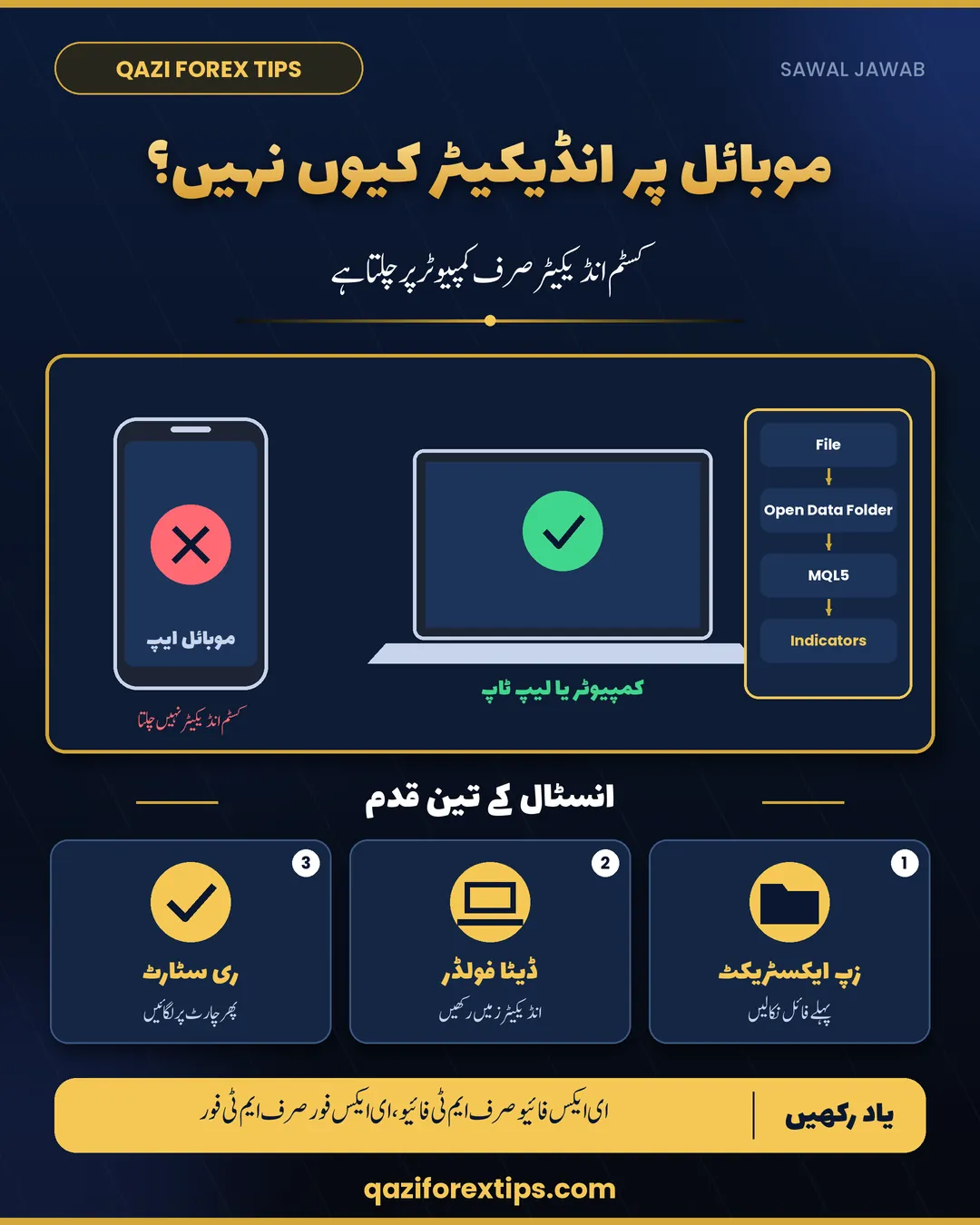
یہ انڈیکیٹر صرف کمپیوٹر/لیپ ٹاپ کے MT5 یا MT4 کے لیے ہے۔ موبائل کی MT5 ایپ میں کوئی بھی کسٹم انڈیکیٹر نہیں چلتا، یہ MetaQuotes کی لمٹیشن ہے، ہماری نہیں۔ اس لیے موبائل پر "no such file" یا "link doesn't work" آئے گا۔
لنک بالکل ٹھیک کام کر رہا ہے۔ کمپیوٹر پر qaziforextips.com کھولیں، Free Tools میں انڈیکیٹر پر جائیں، MT5 یا MT4 والا بٹن دبائیں، zip ڈاؤن لوڈ ہو گا۔
zip کھولیں، اس میں انڈیکیٹر فائل اور انسٹال گائیڈ PDF ہے۔ MT5 میں File > Open Data Folder > MQL5 > Indicators میں فائل رکھیں، MT5 بند کر کے دوبارہ کھولیں، Navigator میں انڈیکیٹر مل جائے گا۔ MT4 میں MQL4 > Indicators۔
جن کو MT5 مشکل لگتا ہے: پہلے دن سب کو لگتا ہے۔ گائیڈ PDF میں تصویروں کے ساتھ قدم بہ قدم لکھا ہے، ایک بار کر لیں گے تو ہر انڈیکیٹر ایسے ہی لگتا ہے۔ پھر بھی مسئلہ ہو تو سکرین شاٹ کے ساتھ بتائیں کہ کس سٹیپ پر رک رہے ہیں۔
Why it does not work on a phone
The MetaTrader 5 and MetaTrader 4 mobile apps for Android and iPhone do not run custom indicators or Expert Advisors. They only offer the built-in indicators. That is a limitation of the apps, not of any particular indicator. On a phone the downloaded zip has nowhere to go, which is why people see "no such file" or think the link is broken.
How to install a custom indicator in MT5 (PC or laptop)
- Download the zip on your computer and extract it (right-click → Extract All). Do not try to use the file inside the zip.
- Open MT5 and click File → Open Data Folder.
- Open MQL5 → Indicators and paste the indicator file (
.ex5) there. - Close MT5 and open it again, or right-click Indicators in the Navigator and choose Refresh.
- Drag the indicator from the Navigator onto your chart.
For MT4 the steps are the same, but the folder is MQL4 → Indicators and the file ends in .ex4.
If it still does not appear
- Wrong platform: an
.ex5file works only in MT5, an.ex4only in MT4. - Wrong folder: it must be inside Indicators, not in Experts or Scripts.
- Several MT5 installs: each broker's MT5 has its own data folder. Use Open Data Folder from the MT5 you actually trade on.
- Still stuck: send a screenshot of the step where you stop.
"MT5 is too difficult"
Everyone feels that on day one. Install one indicator once, following the guide, and the next one takes a minute.
Khulasa (Roman Urdu / Hindi)
- MT5/MT4 ki mobile app mein koi custom indicator ya EA nahi chalta; sirf PC/laptop par.
- Zip ko pehle extract karein.
- MT5: File > Open Data Folder > MQL5 > Indicators mein file rakhein, MT5 restart karein.
- MT4: MQL4 > Indicators; .ex5 sirf MT5, .ex4 sirf MT4.
- Phir bhi masla ho to screenshot ke sath batayein kis step par ruk rahe hain.
Questions
Can I use custom indicators on MT5 mobile?
No. The MT5 and MT4 mobile apps only support built-in indicators. Custom indicators and EAs need the desktop platform on a PC or laptop.
How do I install an indicator in MT5?
Extract the zip, then in MT5 go to File, Open Data Folder, MQL5, Indicators, paste the .ex5 file, and restart MT5 or refresh the Navigator.
Why is my indicator not showing in the Navigator?
It is usually in the wrong folder, extracted to a different MT5 installation, or it is an MT4 file in MT5. Use Open Data Folder from the MT5 you trade on.
Can I use an MT4 indicator in MT5?
No. MT4 files (.ex4) and MT5 files (.ex5) are not compatible with each other.
Does the indicator work on a Mac?
MetaTrader on a Mac runs differently from Windows; many traders use a Windows PC, laptop or Windows VPS for custom tools.
اکثر پوچھے جانے والے سوال
کیا موبائل MT5 میں کسٹم انڈیکیٹر لگ سکتا ہے؟
نہیں۔ موبائل ایپ میں صرف بلٹ ان انڈیکیٹر چلتے ہیں، کسٹم انڈیکیٹر کے لیے کمپیوٹر یا لیپ ٹاپ چاہیے۔
MT5 میں انڈیکیٹر کہاں رکھیں؟
File > Open Data Folder > MQL5 > Indicators میں فائل رکھیں اور MT5 دوبارہ کھولیں۔
انڈیکیٹر Navigator میں نظر نہیں آ رہا؟
دیکھیں فائل صحیح فولڈر میں ہے، zip کھولی ہے، اور فائل MT5 کی ہے MT4 کی نہیں۔
Aksar Pooche Jane Wale Sawal (Roman Urdu / Hindi)
MT5 mein indicator kaise install karein?
Zip extract karein, MT5 mein File > Open Data Folder > MQL5 > Indicators mein file paste karein, phir MT5 restart karein.
Mobile MT5 par custom indicator chal sakta hai?
Nahi, mobile app mein sirf built-in indicators hain; custom indicator ke liye computer chahiye.
Indicator download karne ke baad file nahi mil rahi?
Zip pehle extract karein aur ye kaam computer par karein, mobile par nahi.
Learn more
- Free ICT Killzones indicator for MT5 & MT4
- Free FVG indicator for MT5 & MT4
- All free MT5 tools
- MT4 vs MT5: which one should you use?
Have a question of your own? Ask it in our free Facebook group, with 70,000+ traders learning in Urdu and Hindi.
Join the free groupEducation only, not financial advice. Trading forex, Gold and CFDs carries a high risk of loss. Spreads, leverage and contract sizes differ by broker; check your own broker's specifications.